TooBasic: Forms Builder
What is Forms Builder?
Forms Builder is an internal mechanism of TooBasic that allows to specify HTML forms a JSON configuration. The main idea in it is to create single specification for certain form and be able to show it in more than one mode.
For example, if create a form to display an item in the database, other to edit it, other when you have to remove it and another to create a new item, the first thing you'll notice is that it is the same form where the only change is it's behavior and maybe how many buttons it has at the end. For those cases, Forms Builder provides a way to specify fields once and some specific properties depending on how the form should be built.
Example
Before we start using Form Builder, let's think an example to work with.
Let's suppose you created a table in your system called rooms and it's
representation artifacts (item-reprensentation and items-factory) representing
some part of some house.
Also you created these controllers (along with it's and views):
rooms: To list all rooms.room: To show a room.room_create: To create a new room.room_edit: To modify a room.room_delete: To destroy a room.
Now let's say that you table rooms has these fields:
idnamedescription: a long text.widthheightstatus: Possible values are:AVAILABLEOCCUPIEDREPAIRUNKNOWN
Now, what would be the problem here?
Let's say you want to use a single form definition for all your room controllers
(except controller rooms) and then invoke it inside your view.
The next sections will guide you in how to do such a thing.
Warning
This example will be built step by step so you can see how to create a complete form with its details using commands. But that can be a little tedious, so, if you simply want to create a basic form, this link may be of more use.
Using forms
Creating a form
the first thing to do is to create an initial definition for our form and for that we're going to run this command:
$ php shell.php sys forms create table_rooms
This command will generate a new Forms Builder specification file at
ROOTDIR/site/forms/table_rooms.json with some basic structure (not yet useful).
We won't go into specifics regarding the actual configuration, for that you can
click this link and get more information about it.
Form name
Something we suggest you to set is the form's name, this simple property will be used as form ID when building a HTML version and also in it's inputs IDs. If you want you can omit this step because the previous one already used the file name to set this property, but if you want to change it you can run this command (it won't change the file name):
$ php shell.php sys forms --set-name my_form --form table_rooms
From now on, will assume you've run this command.
Form action and method
By default all your form are going to be sent to # (same page) and they will use
GET as sending method, but you can change this using commands like this:
$ php shell.php sys forms --set-action '?action=someaction' --form table_rooms
$ php shell.php sys forms --set-method 'post' --form table_rooms
This will get you something like this:
<form id="my_form" action="?action=someaction" method="post">
But of course, this could be what you want, but only for some usage of your form, not for everything. For example, if you use this form to make a creation dry-test and only then you need these values, you can run something like this:
$ php shell.php sys forms --set-action '?action=someaction' --form table_rooms --mode dry_test
$ php shell.php sys forms --set-method 'post' --form table_rooms --mode dry_test
With this, you'll be using default values unless you build your form for
dry_test mode.
Something to have in mind is that dry_test is not an standard (known by
TooBasic mode) which means may not apply some useful behaviors, but you can
use it anyway.
Standard modes are:
createeditremoveview
Form type
The form type indicates how your form is going to be build, basically what HTML structure it's going to have. You can set it this way:
$ php shell.php sys forms --set-type bootstrap --form table_rooms
Available types are:
basic: Simple structure where each label is prompted (in the HTML code) alongside it's form control without any encasing.table: Inside the form, a table is prompted with two columns, left for labels and right for form controls.bootstrap: This type follows the encasing suggested by Bootstrap ar this link.
Form attributes
Something else you can set on a form are attributes for the HTML tag <form>, for
example:
$ php shell.php sys forms --set-attribute role --value form --form table_rooms
This will generate something like this:
<form id="my_form" action="#" method="get" role="form">
And you can also run a command like this:
$ php shell.php sys forms --set-attribute onsubmit --value "return confirm('Are you sure you want to remove this room?')" --form table_rooms --mode remove
This will show a confirmation alert when your form is submitted if it was build for remove mode.
Something you should know about setting attributes is that you can specify attributes without values, for example this Angular.js flag:
$ php shell.php sys forms --set-attribute ng-non-bindable --true --form table_rooms
This will give you something like this:
<form id="my_form" action="#" method="get" role="form" ng-non-bindable>
Form fields
Now that we have our basic structure, we need to add fields and for that we're going to run these commands:
$ php shell.php sys forms --add-field id --type hidden --form table_rooms
$ php shell.php sys forms --add-field name --type input --form table_rooms
$ php shell.php sys forms --add-field description --type text --form table_rooms
$ php shell.php sys forms --add-field width --type input --form table_rooms
$ php shell.php sys forms --add-field height --type input --form table_rooms
$ php shell.php sys forms --add-field status --type enum:AVAILABLE:OCCUPIED:REPAIR:UNKNOWN --value UNKNOWN --form table_rooms
This with specify our six fields with their types, and in the case of status, it
will also tell which values are accepted and the default value for it.
But let's go a little further.
Because we're using a form of type bootstrap, we can add some nice classes to
our form controls, for example:
$ php shell.php sys forms --set-field-attribute id --name class --value input-sm --form table_rooms
$ php shell.php sys forms --set-field-attribute name --name class --value input-sm --form table_rooms
$ php shell.php sys forms --set-field-attribute description --name class --value input-sm --form table_rooms
$ php shell.php sys forms --set-field-attribute width --name class --value input-sm --form table_rooms
$ php shell.php sys forms --set-field-attribute height --name class --value input-sm --form table_rooms
$ php shell.php sys forms --set-field-attribute status --name class --value input-sm --form table_rooms
Now our form controls will appear thinner :)
Field labels
By default all field labels are build using field names and the prefix
label_formcontrol_ unless you modify them by running commands like these:
$ php shell.php sys forms --set-field-label name --value 'table_column_name' --form table_rooms
$ php shell.php sys forms --set-field-label description --value 'table_column_description' --form table_rooms
$ php shell.php sys forms --set-field-label width --value 'table_column_width' --form table_rooms
$ php shell.php sys forms --set-field-label height --value 'table_column_height' --form table_rooms
$ php shell.php sys forms --set-field-label status --value 'table_column_status' --form table_rooms
This commands sets the label we want for our fields except field id, we don't
care about its label because it's a hidden field.
Warning: You should have in mind that these labels won't show directly, they will always be considered as translation keys and they'll be translated at building time.
Field exclusions
At this point we show consider a security matter.
Our field id is useful for almost all our forms, except when we are creating a
new room or we are just showing a room, in those cases it should not be prompted
in our HTML form codes, so we need to exclude it.
For that, we need to execute something like this:
$ php shell.php sys forms --set-field-exmodes id --value create,view --form table_rooms
From now on, whenever you build your form for create or view modes, field id
won't appear.
Buttons
The last part you should specify for your form are buttons and here we're going to make the next assumptions:
- All form buttons use the style
btn-smfor not so big buttons. - All form modes require a
submitbutton and aresetexcept moderemove. **submitbuttons use the stylebtn-success. - Form mode
removehas only asubmitbutton using the stylebtn-danger.
With all this things in mind, let's run these commands to create our buttons:
$ php shell.php sys forms --add-button send --type submit --form table_rooms
$ php shell.php sys forms --add-button clear --type reset --form table_rooms
$ php shell.php sys forms --add-button delete --type submit --form table_rooms --mode remove
And now let's set some styles:
$ php shell.php sys forms --set-button-attribute send --name class --value 'btn-sm btn-success' --form table_rooms
$ php shell.php sys forms --set-button-attribute clear --name class --value btn-sm --form table_rooms
$ php shell.php sys forms --set-button-attribute delete --name class --value 'btn-sm btn-danger' --form table_rooms --mode remove
Button labels
By default, all buttons get a label using its name and the prefix btn_, but you
can change this using a command like this one:
$ php shell.php sys forms --set-button-label delete --value 'btn_delete_room' --form table_rooms --mode remove
Warning: Again, you should have in mind that these labels won't show directly, they will always be considered as translation keys and they'll be translated at building time.
Commands summary
By now you may be confused on what commands we've run and what command was just used as an example, so let's show a full list of commands we considered to be run in our example:
$ php shell.php sys forms create table_rooms
$ php shell.php sys forms --set-name my_form --form table_rooms
$ php shell.php sys forms --set-action '?action=someaction' --form table_rooms --mode dry_test
$ php shell.php sys forms --set-method 'post' --form table_rooms --mode dry_test
$ php shell.php sys forms --set-type bootstrap --form table_rooms
$ php shell.php sys forms --set-attribute role --value form --form table_rooms
$ php shell.php sys forms --set-attribute onsubmit --value "return confirm('Are you sure you want to remove this room?')" --form table_rooms --mode remove
$ php shell.php sys forms --set-attribute ng-non-bindable --true --form table_rooms
$ php shell.php sys forms --add-field id --type hidden --form table_rooms
$ php shell.php sys forms --add-field name --type input --form table_rooms
$ php shell.php sys forms --add-field description --type text --form table_rooms
$ php shell.php sys forms --add-field width --type input --form table_rooms
$ php shell.php sys forms --add-field height --type input --form table_rooms
$ php shell.php sys forms --add-field status --type enum:AVAILABLE:OCCUPIED:REPAIR:UNKNOWN --value UNKNOWN --form table_rooms
$ php shell.php sys forms --set-field-attribute id --name class --value input-sm --form table_rooms
$ php shell.php sys forms --set-field-attribute name --name class --value input-sm --form table_rooms
$ php shell.php sys forms --set-field-attribute description --name class --value input-sm --form table_rooms
$ php shell.php sys forms --set-field-attribute width --name class --value input-sm --form table_rooms
$ php shell.php sys forms --set-field-attribute height --name class --value input-sm --form table_rooms
$ php shell.php sys forms --set-field-attribute status --name class --value input-sm --form table_rooms
$ php shell.php sys forms --set-field-label name --value 'table_column_name' --form table_rooms
$ php shell.php sys forms --set-field-label description --value 'table_column_description' --form table_rooms
$ php shell.php sys forms --set-field-label width --value 'table_column_width' --form table_rooms
$ php shell.php sys forms --set-field-label height --value 'table_column_height' --form table_rooms
$ php shell.php sys forms --set-field-label status --value 'table_column_status' --form table_rooms
$ php shell.php sys forms --set-field-exmodes id --value create,view --form table_rooms
$ php shell.php sys forms --add-button send --type submit --form table_rooms
$ php shell.php sys forms --add-button clear --type reset --form table_rooms
$ php shell.php sys forms --add-button delete --type submit --form table_rooms --mode remove
$ php shell.php sys forms --set-button-attribute send --name class --value 'btn-sm btn-success' --form table_rooms
$ php shell.php sys forms --set-button-attribute clear --name class --value btn-sm --form table_rooms
$ php shell.php sys forms --set-button-attribute delete --name class --value 'btn-sm btn-danger' --form table_rooms --mode remove
$ php shell.php sys forms --set-button-label delete --value 'btn_delete_room' --form table_rooms --mode remove
Quite a lot, but this is the base for a good example.
Views
Now that you have your definition, you can use it in your views and we are going to explain the difference for each one. Now modes will make more sense.
$ctrl->formFor()
Forms Builder provides you with a special function for you Smarty templates
called formFor that allows you to render and insert a form based on one of your
configurations.
Such function requires three parameters and these are:
- specification: Name of your form specification.
- item: An associative array with values that can be used to fill your for.
- mode: Mode in which the form has to be built.
Create view
Let's edit you view room_create.html and write something like this inside (using
Smarty):
{$ctrl->formFor('table_rooms', false, 'create')}
This simple command will trigger the building of form table_rooms and generate
it for mode create, this will basically means that all form controls will be
shown with their default values.
Even if the second parameters is other than false, it will be ignored.
The result you'll get will look like this:
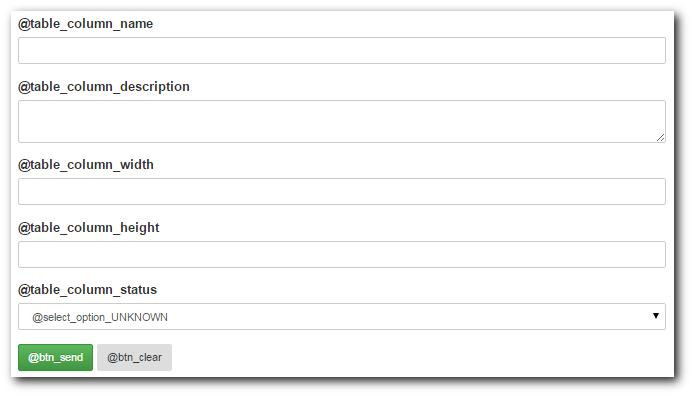
As we mention before, all labels are translation keys which means you need to define them. Visit this link for more information about it.
Show view
Before we talk about how it looks like, let's make a modification in your
controller room.php. let's say we change it's default method into something like
this:
protected function basicRun() {
    $room = $this->representation->rooms->item($this->params->get->id);
    $this->assign('room', $room ? $room->toArray() : false);

    return $this->status();
}
With that in mind, and supposing that you have all required representations
implemented, we're going to write something like this in your view room.html:
{$ctrl->formFor('table_rooms', $room, 'view')}
And it may look like this:
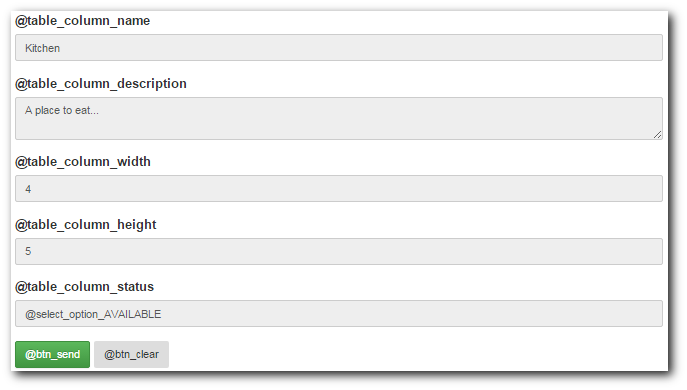
Now, the two major differences you'll find is that this form has all field flagged as read only and it's using the information from your item to fill each field with some initial values.
Edit view
Using this for view room_edit.html:
{$ctrl->formFor('table_rooms', $room, 'edit')}
You'll get something like this:

This is similar to the previous example, but all field can be modified.
Remove view
And using this for view room_delete.html:
{$ctrl->formFor('table_rooms', $room, 'remove')}
You'll get something like this:
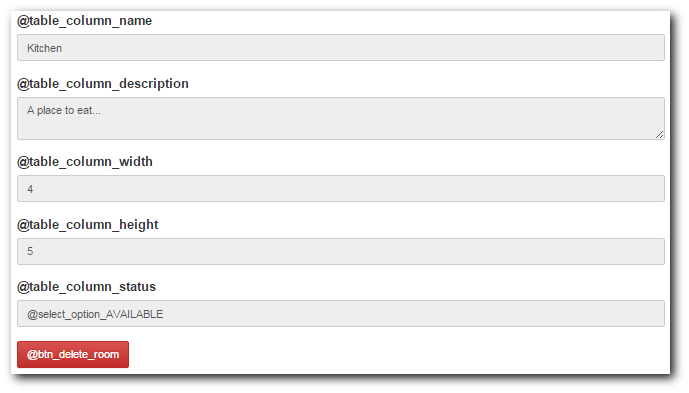
Here the differences are all fields in read-only mode and the red button we set before with our commands. Also, if you click the red button, it will present a confirmation modal and then send data, also set by our commands.
Removing
Now that you know how to created and add properties to your forms, you need to be aware of these commands that will let you remove undesired properties. Let's write a list of examples of what you can do:
- Removing a specifiction file.
$ php shell.php sys forms remove table_rooms - Removing form's virtual name.
$ php shell.php sys forms --remove-name --form table_rooms - Removing form's action for method 'dry_test'.
$ php shell.php sys forms --remove-action --form table_rooms --mode dry_test - Removing form's method.
$ php shell.php sys forms --remove-method 'post' --form table_rooms - Removing form's attribute 'role'.
$ php shell.php sys forms --remove-attribute role --form table_rooms - Removing field 'height'.
$ php shell.php sys forms --remove-field height --form table_rooms - Removing field's attribute 'class' from field 'status'.
$ php shell.php sys forms --remove-field-attribute status --name class --form table_rooms - Removing field's label from field 'name'.
$ php shell.php sys forms --remove-field-label name --form table_rooms - Removing field's excluded modes.
$ php shell.php sys forms --remove-field-exmodes id --form table_rooms - Removing button 'delete' from mode 'remove'.
$ php shell.php sys forms --remove-button delete --form table_rooms --mode remove - Removing button's attribute 'class' from button 'send'.
$ php shell.php sys forms --remove-button-attribute send --name class --form table_rooms - Removing button's label 'class' from button 'send'.
$ php shell.php sys forms --remove-button-label send --form table_rooms
Representations?
Well, you've read all this and you want to use it in your representations but it's
going to a pain to do all this on each table.
Well, don't panic because unless you use the parameter --no-forms-builder, the
sys-tool table already generates a Forms Builder specification for your
table and all view (except list) use it with the proper values.
Extras parameters
Sys-tool forms also accept parameters like:
--module: to indicate that all artifacts have to be generated inside certain module.
Suggestions
If you want or need it, you may visit these documentation pages: